Friday, September 10, 2021

Digital Citizenship


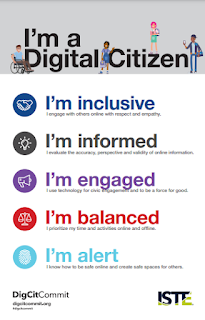
Technology has greatly changed but one thing has remained constant: the importance of teaching students how to respect and protect themselves and others online.  Digital Citizenship is more than just online safety.  More than creating a strong password.


ISTE website reads, “Digital citizenship shouldn’t be a long list of don’ts. It should be about the do’s that help create thoughtful, empathetic digital citizens who can wrestle with the important ethical questions at the intersection of technology and humanity.” 

Those do’s include:

  • Using technology to make your community better.

  • Engaging respectfully online with people who have different beliefs than you.

  • Using technology to make your voice heard by public leaders and shape public policy.

  • Determining the validity of online sources of information.

Tuesday, September 7, 2021

Schoology Images, Tutorials, and Gifs

Take out the guesswork for students - include images, tutorials, and/or gifs of how to submit materials in Schoology from this new shared folder of Schoology Images, Tutorials, and Gifs. These are student-centered instructions and views to help them navigate through Schoology.

Above is a gif for students on how to submit/import a Google Doc created in Drive. This is found in the new shared folder.


Do you need other student instructions in a tech gif, image, or video? Submit your request through the Google Form.


Website Availability Check

You’ve found a wonderful, new website or video to share with your students tomorrow and are so excited for the lesson. Then when you start the lesson the next day, you realize that it is blocked and students can’t use it during class.

Does this sound familiar? Good news! Parkway now has a new filter that allows you to check the website's availability. Follow these instructions to check for website availability. Please be aware with this new filter, we have had to reset some allowances. Contact your building Technology Specialist or the Technology Help Desk for these allowances.


Monday, August 30, 2021

Grouping Tabs


Grouping Tabs Teacher Tip


Are you a tab minimalist or a tab extremist?

This Google update will help both groups.


Watch tutorial video here.


Friday, August 27, 2021

Parent University


Are you interested in learning more about the online platforms that Parkway is using with students during distance and virtual learning? 


Parent University is a course created in Schoology, our district Learning Management System, that has information about Schoology, Google for Education, videoconferencing, and digital citizenship. Within the course you will find information that will help you understand the tools students use as well as opportunities for you to experience the tools from the student perspective. The goal of the course is to support you in feeling confident that you can help your child(ren) with online learning in Parkway. While you are welcome to explore the materials in any order, it would be beneficial to work through the Schoology folder first to learn how to interact with tools you will encounter in other folders. Follow these directions to enroll in the Parkway Parent University Schoology Course! Be sure to scroll down to page 2.


Written By: Elegan Kramer